> For the complete documentation index, see [llms.txt](https://docs.mailtrap.io/llms.txt). Markdown versions of documentation pages are available by appending `.md` to page URLs; this page is available as [Markdown](https://docs.mailtrap.io/email-api-smtp/setup/bulk-stream.md).
# Bulk Stream
Integrate Mailtrap Bulk Stream via API or SMTP. Get credentials, use SDKs or code samples, and send promotional emails with built-in compliance features.
## What is Bulk Stream?
Bulk Stream is Mailtrap's dedicated infrastructure for sending marketing, promotional, and non-transactional emails. It's designed to handle high-volume email campaigns while maintaining optimal deliverability and compliance with industry standards.
{% hint style="warning" %}
**Important**: Mailtrap requires you to use the Bulk Stream for all marketing and promotional emails. This separation protects your transactional email reputation and ensures compliance with email provider requirements.
{% endhint %}
## Why Use Bulk Stream?
### Suppression list separation
* **We separate suppression by a stream**. So e.g. you use one domain for both transactional and bulk emails and your recipients unsubscribed from bulk email - it won't affect your transactional email.
### Deliverability Protection
Using separate streams for transactional and bulk emails is critical for maintaining high deliverability:
* **Reputation Isolation**: Marketing emails don't affect your transactional email reputation. Ideally you should use a seperate subdomain/domain for your bulk emails.
* **Different IP Pools**: Dedicated IPs for bulk sending
* **Optimized Routing**: Infrastructure optimized for bulk sending patterns
* **Better Inbox Placement**: Proper categorization by email providers
### Automatic Compliance Features
Mailtrap automatically adds required elements to comply with Google, Yahoo, and other major providers' bulk sending requirements:
* **List-Unsubscribe Headers**: One-click unsubscribe functionality
* **List-Unsubscribe-Post Headers**: RFC 8058 compliance
* **Precedence Headers**: Proper bulk email identification
* **Unsubscribe Links**: Automatic footer unsubscribe links when not present
{% hint style="info" %}
**Google Requirements**: Starting February 2024, Gmail requires authentication, easy unsubscribe, and low spam rates for senders of 5,000+ daily emails. Mailtrap's Bulk Stream automatically handles these requirements.
{% endhint %}
## How to Use Bulk Stream
### Key Differences from Transactional Stream
The main difference from a user perspective is the endpoint/host you use:
| Stream | SMTP Host | API Base URL |
| ------------- | ----------------------- | ---------------------------------- |
| Transactional | `live.smtp.mailtrap.io` | `https://send.api.mailtrap.io/api` |
| Bulk | `bulk.smtp.mailtrap.io` | `https://bulk.api.mailtrap.io/api` |
**Important**: The API structure and calls remain the same - only the domain changes.
### Using with SDKs
Our official SDKs make it easy to switch between streams:
```javascript
// Node.js SDK example
const { MailtrapClient } = require("mailtrap");
// For bulk emails
const bulkClient = new MailtrapClient({
token: "your_api_token",
bulk: true // This flag switches to bulk stream
});
// Send bulk email
await bulkClient.send({
from: { email: "marketing@yourdomain.com" },
to: [{ email: "subscriber@example.com" }],
subject: "Our Monthly Newsletter",
html: "
Newsletter content...
",
category: "newsletter" // Categorize for analytics
});
```
## Setup Instructions
{% stepper %}
{% step %}
**Verify Your Sending Domain**
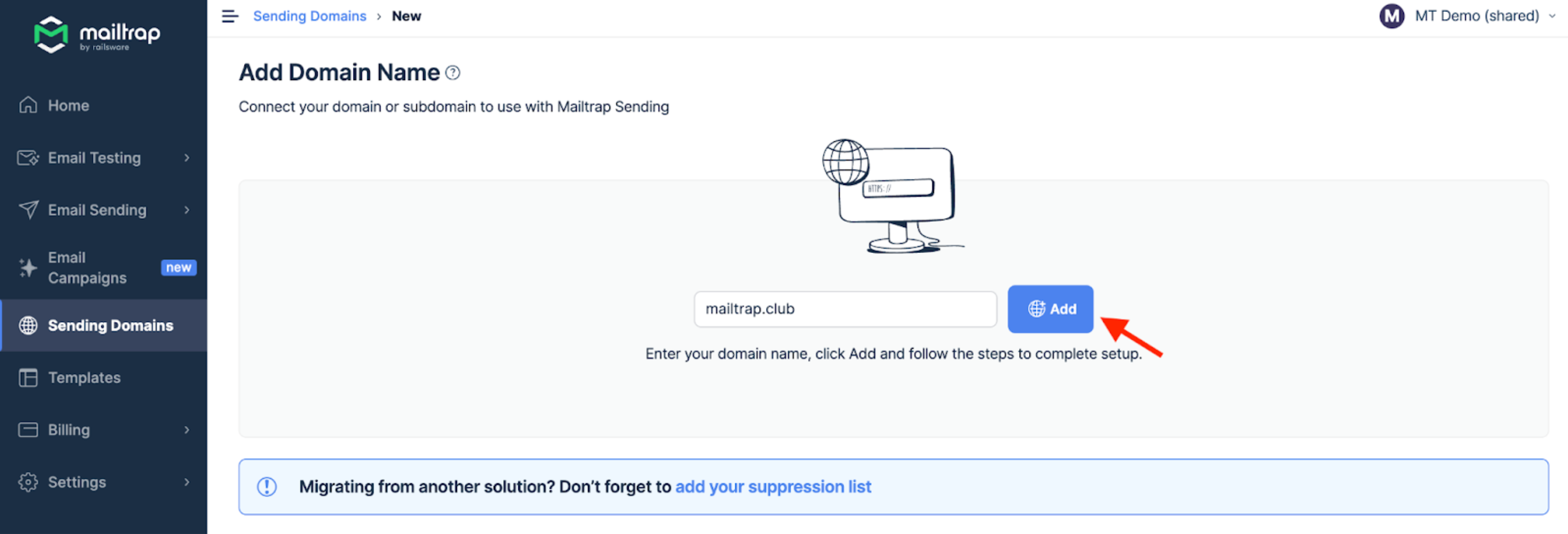
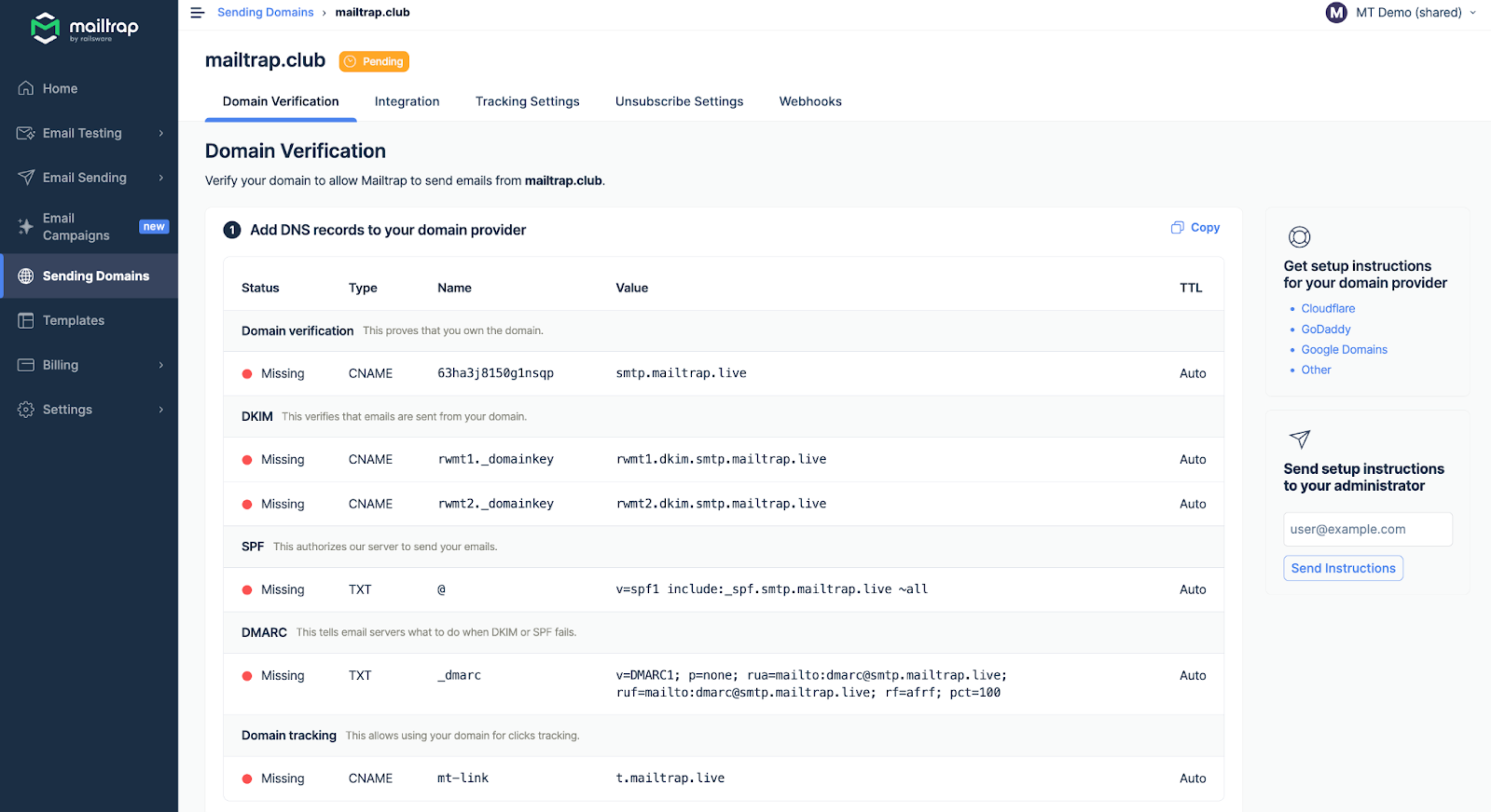
To use Bulk Stream, first verify a domain you own. Go to the Sending Domains tab and click Add Domain. Type your domain name and confirm with the Add button.
Then, add the DNS records Mailtrap provides to your domain provider.
Check our [Sending Domain Setup Guide](/email-api-smtp/setup/sending-domain.md) for detailed instructions on adding and verifying your domain.
{% endstep %}
{% step %}
**Integrate Your Application**
**For SMTP Integration**
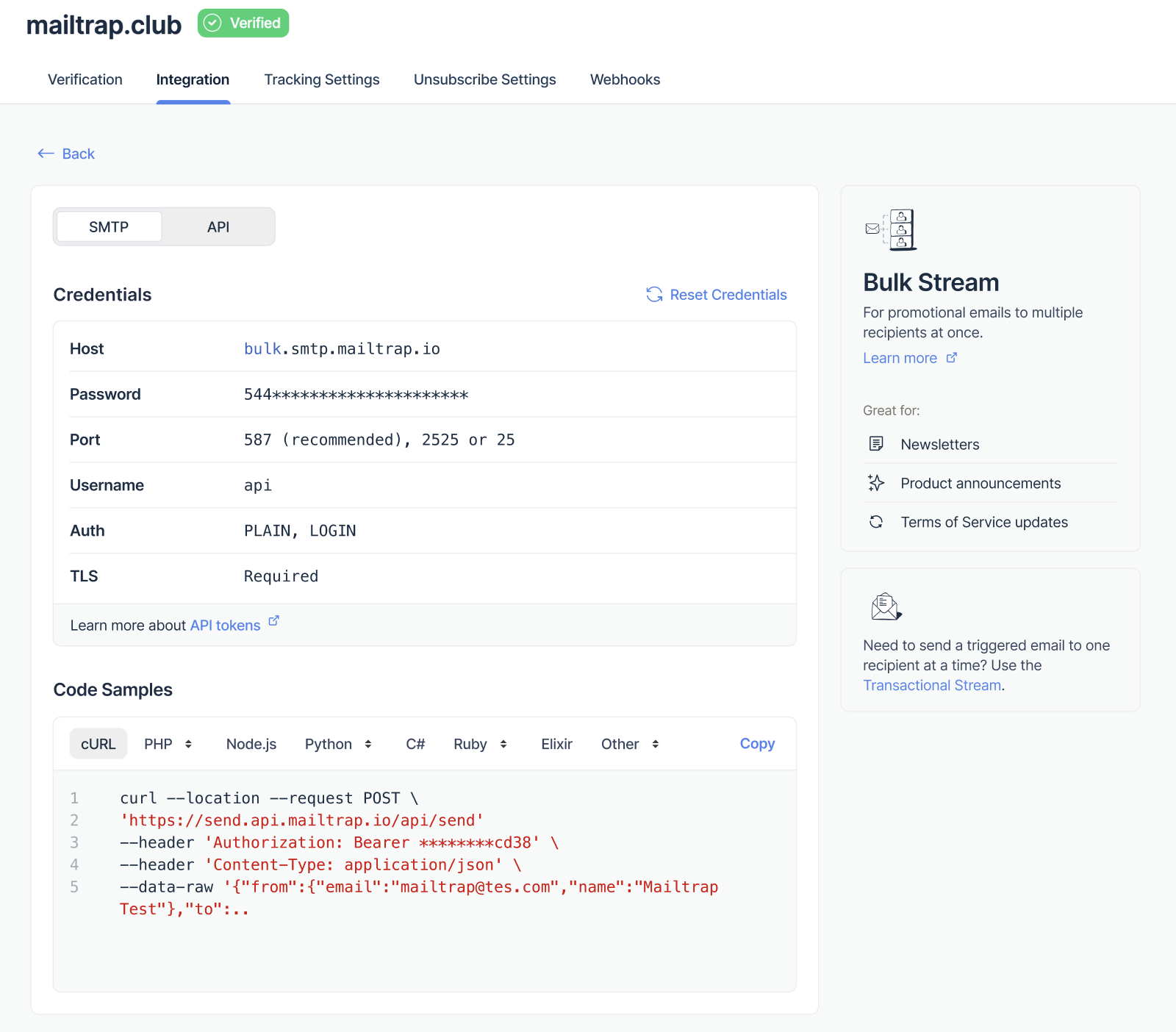
To send emails via Bulk Stream SMTP, use the bulk-specific credentials:
* **Host**: `bulk.smtp.mailtrap.io`
* **Port**: 587 (or 25, 2525, 465 with SSL)
* **Authentication**: Your stream-specific username and password
See our [SMTP Integration Guide](/email-api-smtp/setup/smtp-integration.md) for detailed setup instructions.
**For API Integration**
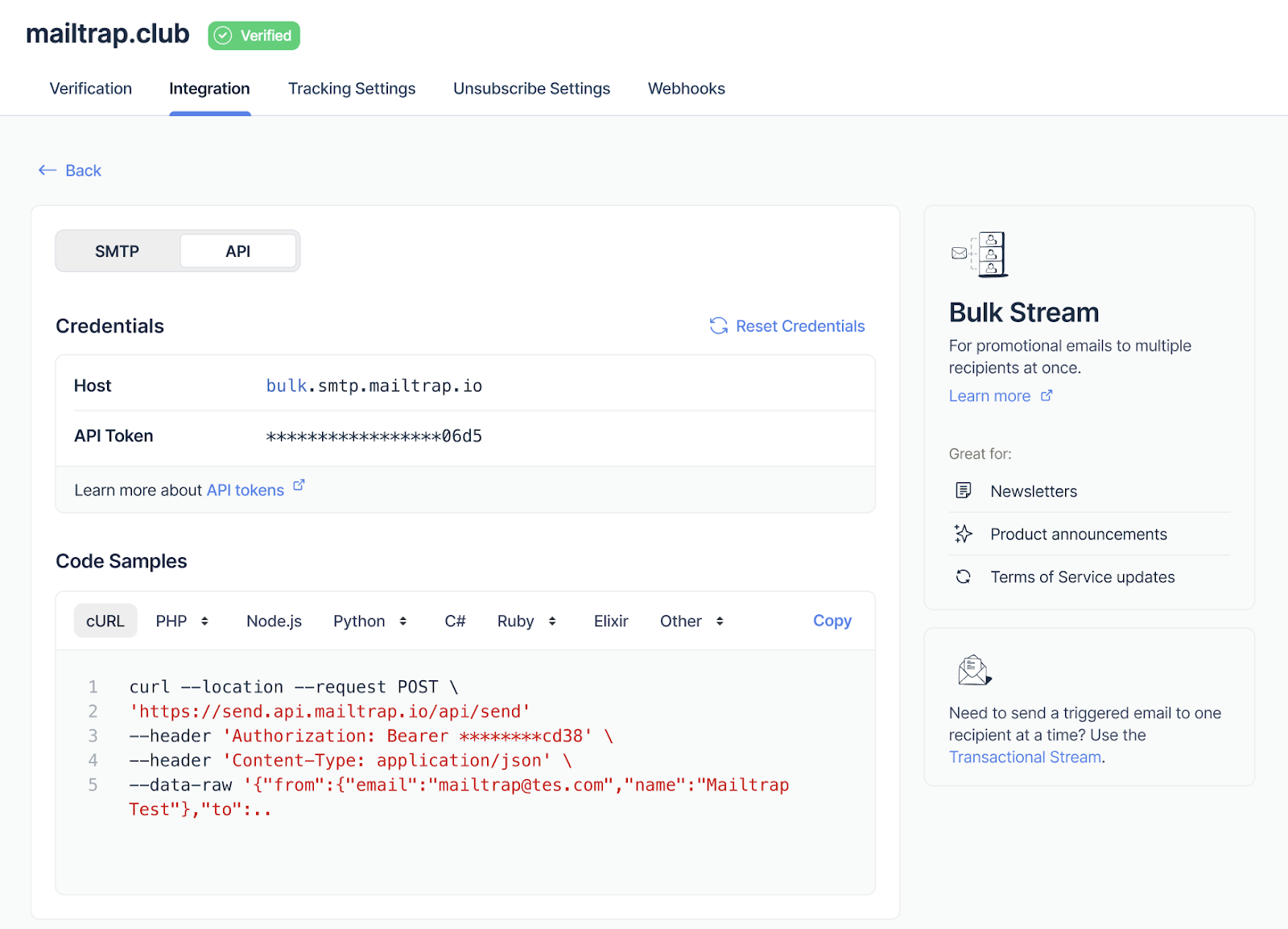
To send via Bulk Stream API, use the bulk endpoint:
* **Base URL**: `https://bulk.api.mailtrap.io/api`
* **Authentication**: Bearer token (same as transactional)
See our [API Integration Guide](/email-api-smtp/setup/api-integration.md) for implementation details.
{% endstep %}
{% endstepper %}
## Bulk Email Best Practices
### Content Guidelines
* Include valuable, relevant content
* Use clear, honest subject lines
* Avoid spam trigger words
* Include your physical mailing address
* Make unsubscribe prominent and functional
### List Management
* Only send to opted-in subscribers
* Implement double opt-in for new subscribers
* Regularly clean your list of inactive users
* Honor unsubscribe requests immediately
* Never purchase email lists
### Sending Patterns
* Start with small volumes and gradually increase
* Maintain consistent sending patterns
* Avoid sudden volume spikes
* Send at optimal times for your audience
* Monitor engagement metrics
## Compliance Information
### Google & Yahoo Requirements (2024)
Starting February 2024, major email providers require:
1. **Authentication**: SPF, DKIM, and DMARC must be properly configured
2. **Easy Unsubscribe**: One-click unsubscribe must be supported
3. **Low Spam Rate**: Keep spam complaints below 0.3%
4. **Valid DNS Records**: Ensure proper forward and reverse DNS
{% hint style="success" %}
**Automatic Compliance**: Mailtrap's Bulk Stream automatically handles authentication headers, unsubscribe mechanisms, and proper email formatting to meet these requirements.
{% endhint %}
### Who is Considered a Bulk Sender?
According to Google's guidelines:
* Any sender reaching **5,000+ messages** to Gmail accounts within 24 hours
* Counted across all subdomains of your primary domain
* Once classified as bulk sender, the designation is permanent
### What Mailtrap Adds Automatically
When using Bulk Stream, Mailtrap automatically includes:
```
List-Unsubscribe: ,
List-Unsubscribe-Post: List-Unsubscribe=One-Click
Precedence: bulk
```
Plus, if no unsubscribe link is detected in your HTML, we add a compliant footer:
```html
```
## Monitoring and Analytics
### Track Performance
* **Delivery Rate**: Monitor successful deliveries
* **Open Rate**: Track email engagement
* **Click Rate**: Measure content effectiveness
* **Bounce Rate**: Identify delivery issues
* **Spam Complaints**: Stay below 0.3% threshold
* **Unsubscribe Rate**: Monitor list health
### Use Email Categories
Categorize your bulk emails for better analytics:
```javascript
// API example with category
{
"category": "newsletter", // or "promotion", "announcement", etc.
"custom_variables": {
"campaign_id": "summer_2024",
"segment": "active_users"
}
}
```
## FAQ
Can I use the same API token for both streams?
Yes, your API token works for both Transactional and Bulk streams. Only the endpoint URL changes.
What happens if I send marketing emails through the Transactional stream?
This can harm your transactional email deliverability and may result in account warnings. Always use Bulk Stream for marketing emails.
Do I need separate domain verification for Bulk Stream?
No, once your domain is verified in Mailtrap, it works for both streams. However, you might want to use subdomains (e.g., marketing.yourdomain.com) for better reputation management.
How do I handle unsubscribes?
Mailtrap automatically adds unsubscribe headers and can manage suppressions. You can also implement your own unsubscribe handling via webhooks.
What's the sending limit for Bulk Stream?
Limits depend on your plan. Start with gradual volume increases to build reputation. Contact support for high-volume needs.
## Related Resources
* [**Email Deliverability Guide**](https://github.com/mailtrap/mailtrap-docs/blob/main/documentation/email-api-smtp/setup/broken-reference/README.md) - Essential reading for bulk senders
* [Sending Domain Setup](/email-api-smtp/setup/sending-domain.md)
* [Email Templates](/email-api-smtp/email-templates.md)
* [Suppressions List](/email-api-smtp/deliverability/suppressions-list.md)
* [Email Categories](/email-api-smtp/analytics/categories.md)
* [IP Warmup](/email-api-smtp/deliverability/ip-warmup.md)
* [Google's Email Sender Guidelines](https://support.google.com/mail/answer/81126)
---
# Agent Instructions
This documentation is published with GitBook. GitBook is the documentation platform designed so that both humans and AI agents can read, navigate, and reason over technical content effectively. Learn more at gitbook.com.
## Querying This Documentation
If you need additional information that is not directly available in this page, you can query the documentation dynamically by asking a question.
Perform an HTTP GET request on the current page URL with the `ask` query parameter, and the optional `goal` query parameter:
```
GET https://docs.mailtrap.io/email-api-smtp/setup/bulk-stream.md?ask=&goal=
```
`ask` is the immediate question: it should be specific, self-contained, and written in natural language.
`goal` is optional and describes the broader end goal you are ultimately trying to accomplish on behalf of the user. GitBook uses it to tailor the answer towards what is most useful for that goal.
The response will contain a direct answer to the question and relevant excerpts and sources from the documentation.
Use this mechanism when the answer is not explicitly present in the current page, you need clarification or additional context, or you want to retrieve related documentation sections.