OpenClaw

Email Sandbox Automation for OpenClaw

When talking about OpenClawarrow-up-right and security, people often mention API access, file permissions, network restrictions, and similar. However, email seems to be often overlooked in this discussion.

At first glance, emails are just another integration. But unlike internal actions, once a message leaves OpenClaw, sensitive information is already in the hands of the attacker

This guide shows you how to integrate Email Sandboxarrow-up-right with OpenClaw so your agent can send emails safely to a sandbox inbox instead of real recipients. This way, you will give your AI agents the capability to:

  • Route agent SMTP to Email Sandbox: Change a few configuration settings, and all your agents' outgoing email goes to your Email Sandbox.

  • Inspect via UI or API: Review emails in Mailtrap's web interface or fetch them programmatically before you move to production.

  • Zero risk to real recipients: No matter what the agent does, emails stay contained within the Sandbox.

Why use Email Sandbox with OpenClaw?

Giving an AI agent email access means enabling it to communicate with the outside world on your behalf. So, for instance, a misinterpreted instruction or a prompt injection attack could send emails you never intended, including ones containing sensitive information.

The community has already seen warning signs:

A user's OpenClaw discovered an insurance rejection email, drafted a rebuttal citing policy language, and sent it without explicit permission. "My @openclaw accidentally started a fight with Lemonade Insurance," he tweeted. "I ignored the draft, and he sent it for me."

Source: Twitter (@Hormold)arrow-up-right

How Email Sandbox helps: Your agent "sends" emails normally, but instead of reaching real recipients, every message lands in your Mailtrap inbox where you can inspect it safely.

How to connect Email Sandbox to OpenClaw

Before we begin, make sure you have:

Getting your Mailtrap credentials

1

Log in to your Mailtrap account

2

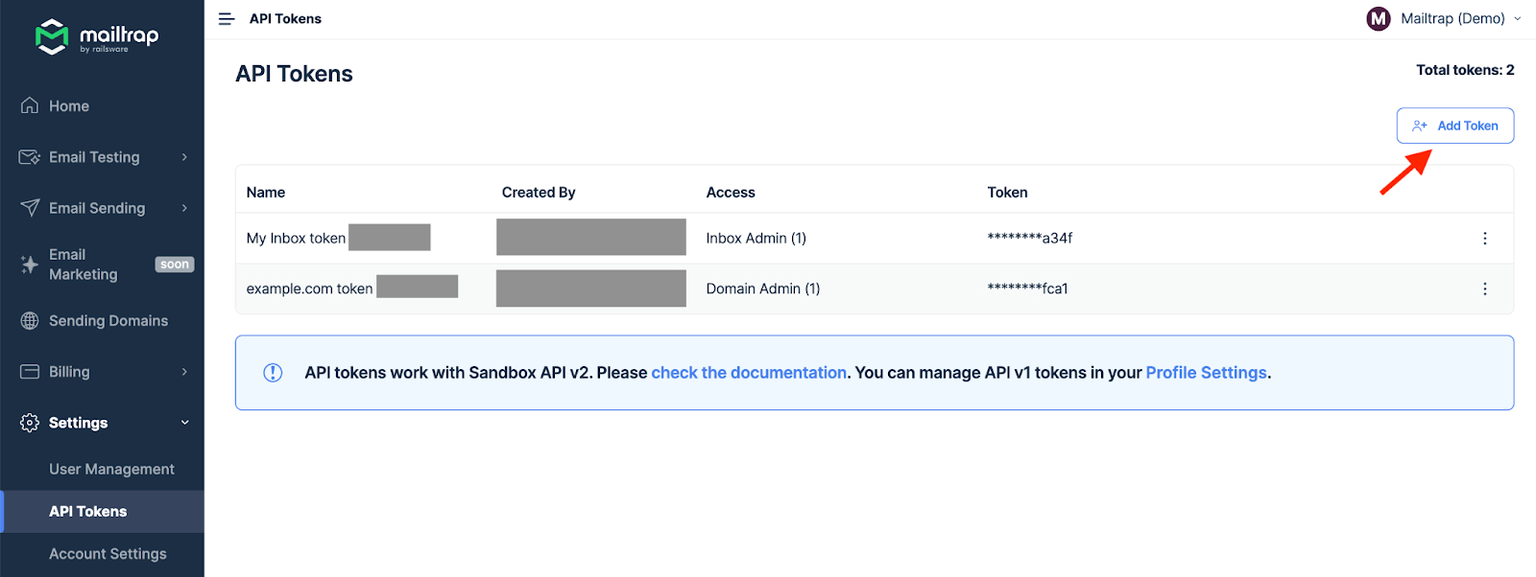
Go to SettingsAPI Tokens, and create a new key

3

Navigate to Sandboxes and select your inbox (or create a new one)

4

Note your Sandbox ID from the URL bar

Step 1. Install the Mailtrap skill

We have prepared an OpenClaw skill so that you can start sending to the Sandbox right away. Currently, it’s available as a GitHub Gistarrow-up-right.

To install it:

  1. Download the skill filearrow-up-right (SKILL.md).

  2. Place it in your OpenClaw workspace's skills directory.

Step 2. Add the Mailtrap credentials

  • Set skills.entries.email_sandbox.env in ~/.openclaw/openclaw.json to include MAILTRAP_API_TOKEN and MAILTRAP_INBOX_ID.

  • Replace your-api-token-here and your-inbox-id-here with your actual Mailtrap credentials.

Step 3. Verify the integration

If you followed everything correctly so far, your OpenClaw agent should be able to send emails using the email_sandbox skill. To verify the integration, try sending a test email.

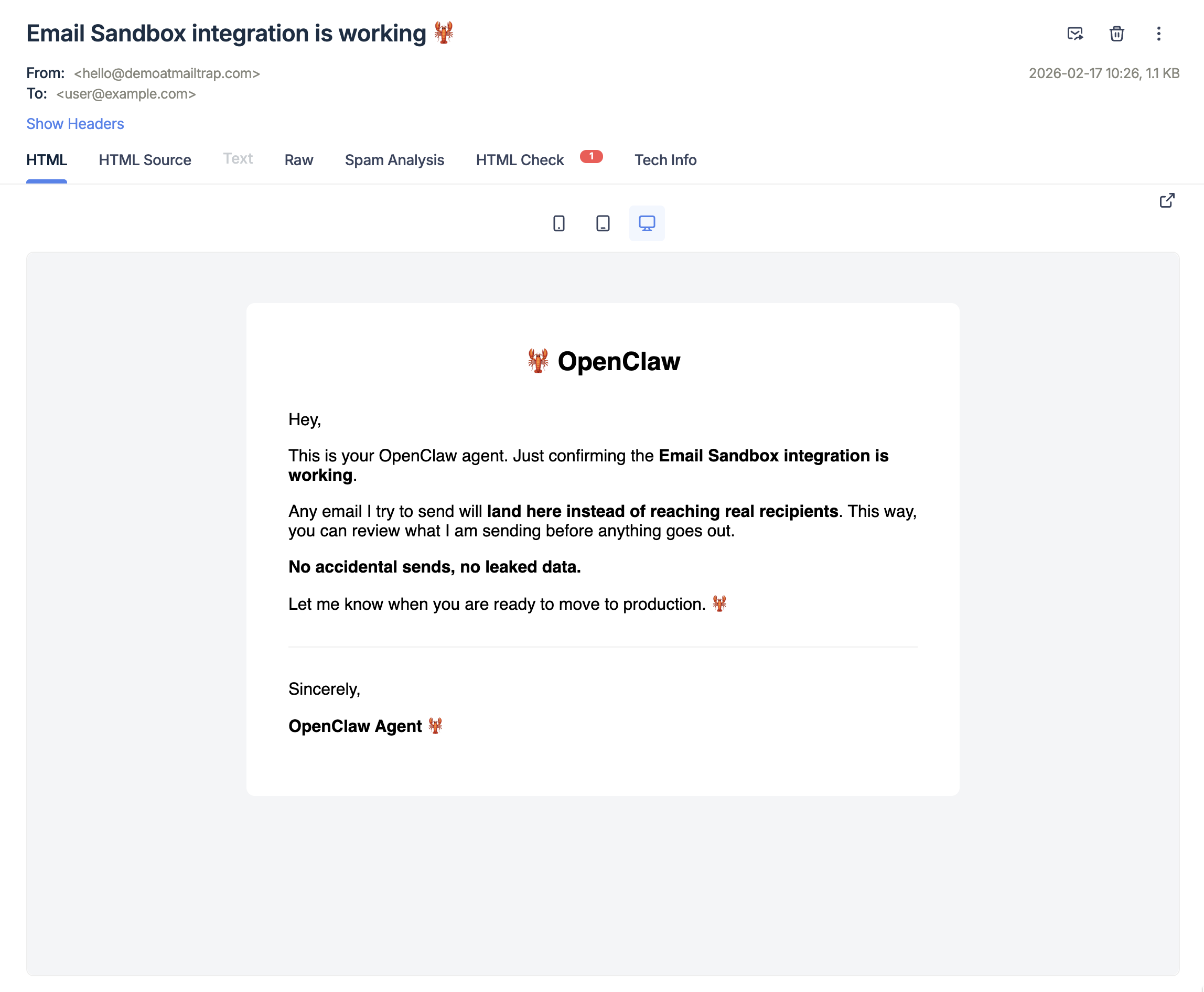
For example, here’s an email AI tried to send for us in our Sandbox:

The email never left Sandbox and no real recipient received it.

What else can the Email Sandbox skill do?

The email_sandbox skill supports the following request parameters:

Parameter
Type
Required
Description

from

object

Yes ✅

Sender info: {"email": "...", "name": "..."}

(name is optional)

to

string

Yes ✅

Recipients: [{"email": "..."}]

subject

string

Yes ✅

Email subject line

text

string

Yes ✅

Plain text body

html

string

No ☑️

HTML body (alternative to plain text)

category

string

No ☑️

Category for organizing emails in Mailtrap

For the complete API specification, see the Mailtrap API documentationarrow-up-right.

Troubleshooting

If no emails are landing in your Sandbox:

  1. Verify your MAILTRAP_API_TOKEN is correct.

  2. Check that MAILTRAP_INBOX_ID matches your inbox.

  3. Ensure the skill environment variables are properly configured in openclaw.json.

  4. Check the OpenClaw logs for any error messages from the curl command.

For more information and details on Email Sandbox and OpenClaw, feel free to consult the official documentation:

What's next

Once you've verified the integration works, you can:

  • Iterate on your workflows: Build automations that involve email, confident that nothing goes out accidentally.

  • Review agent behavior: Check what emails your agent attempts to send before trusting it with real email.

  • Move on to production: When you're confident in your agent's email behavior, you can switch from the Sandbox API to Mailtrap's Email API for real delivery.

Last updated

Was this helpful?