> For the complete documentation index, see [llms.txt](https://docs.mailtrap.io/llms.txt). Markdown versions of documentation pages are available by appending `.md` to page URLs; this page is available as [Markdown](https://docs.mailtrap.io/guides/ai-powered-integrations/antigravity.md).
# Antigravity
[Antigravity](https://antigravity.google/) is Google’s development platform powered by Gemini 3 that gives you an AI-powered IDE experience with autonomous agents that can plan, execute, and verify complex software tasks across your editor.
In this guide, you’ll learn how to integrate it with the Mailtrap MCP which allows you to, amongst other things, perform the following actions:
* [Connect Mailtrap to your project](#integrating-mailtrap-into-your-project)
* [Fetch and preview Sandbox messages](#sandbox-operations-during-code-review)
* [Validate and edit email templates during code review](#template-validation-during-code-review)
* [Forward email templates to your teammates](#sending-emails-to-your-teammate)
**Note**: Mailtrap offers a free, 4000 email/month Email API and SMTP plan.
#### Prerequisites
Before you start, make sure to:
* Set up your [sending domain](https://docs.mailtrap.io/email-api-smtp/setup/sending-domain) (this takes approximately 5 minutes).
* Install the [latest Node.js version](https://nodejs.org/en) since [Mailtrap MCP](https://www.npmjs.com/package/mcp-mailtrap) is implemented as a Node.js command line utility.
### Step 1. Add Mailtrap MCP to Antigravity
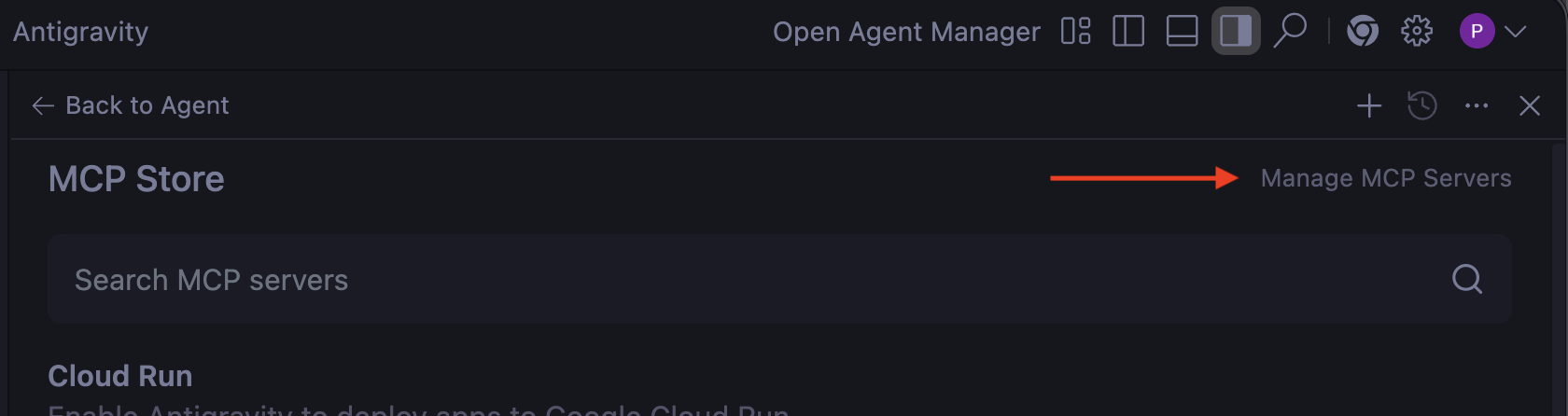
Start by opening the Antigravity and clicking on **MCP Servers** from the three-dotted menu in the upper-right corner of the agent chatbox.
Next, click on **Manage MCP Servers**.
Then, click on **View raw config**, which should open the **mcp\_config.json** file.
In the **mcp\_config.json** file, simply copy/paste the following code snippet:
```json
{
"mcpServers": {
"mailtrap": {
"command": "npx",
"args": ["-y", "mcp-mailtrap"],
"env": {
"MAILTRAP_API_TOKEN": "your_mailtrap_api_token",
"DEFAULT_FROM_EMAIL": "your_sender@example.com",
"MAILTRAP_ACCOUNT_ID": "your_account_id",
"MAILTRAP_TEST_INBOX_ID": "your_test_inbox_id"
}
}
}
}
```
### Step 2. Insert Mailtrap API credentials
Next, all you need to do is replace the following values in the **mcp\_config.json** file:
* `MAILTRAP_API_TOKEN` – Required for all functionality, used to authenticate API requests, which you can copy/paste from the credentials tab.
* `DEFAULT_FROM_EMAIL` – Required for email sending. Make sure the email’s domain matches your own domain from the **Sending Domains** tab in Mailtrap.
You can find these credentials in your Mailtrap account by navigating to **Sending Domains** → **Integration** → **API**.
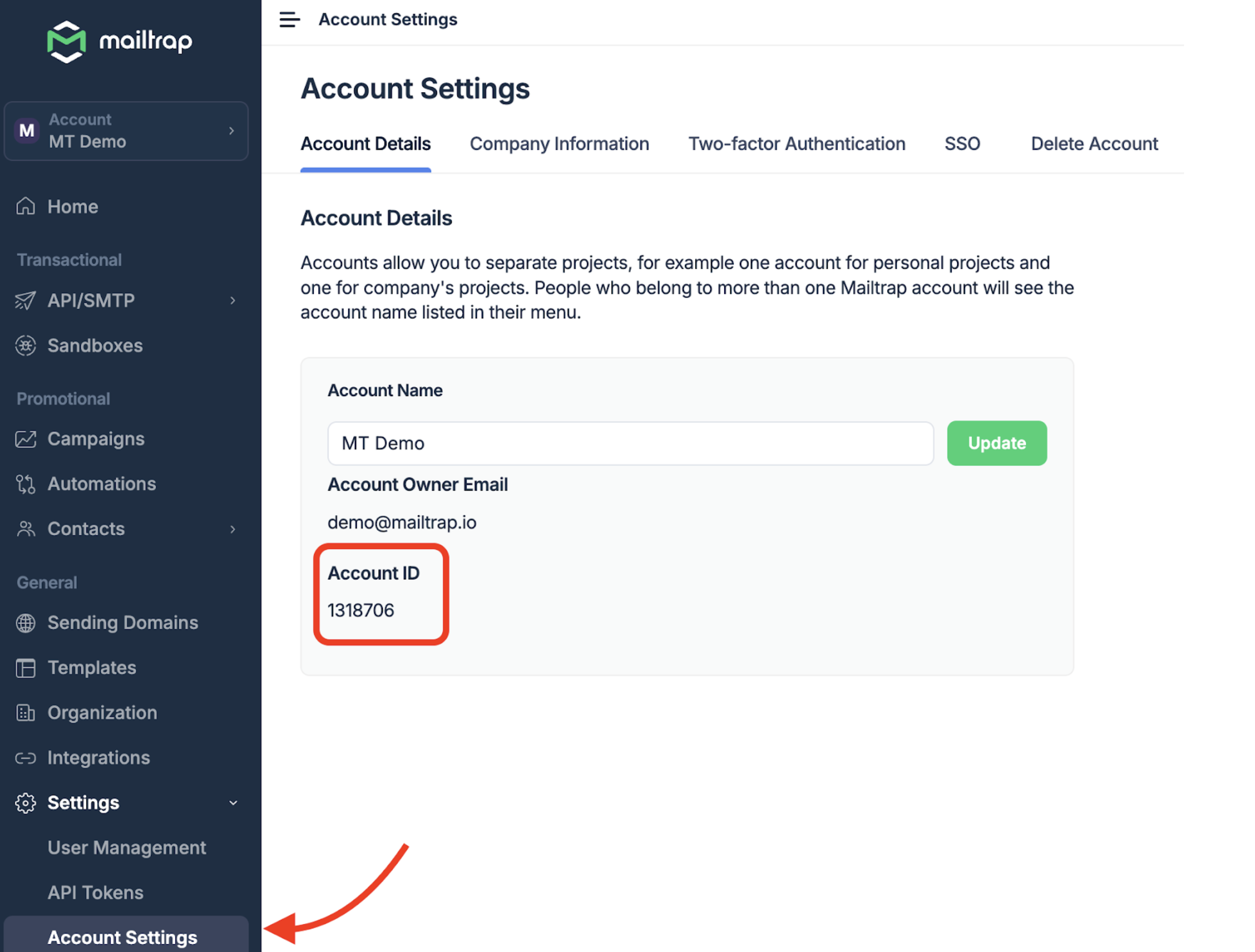
* `MAILTRAP_ACCOUNT_ID` – This is required for template management purposes. You can find the account ID under **Settings** → **Account Settings**.
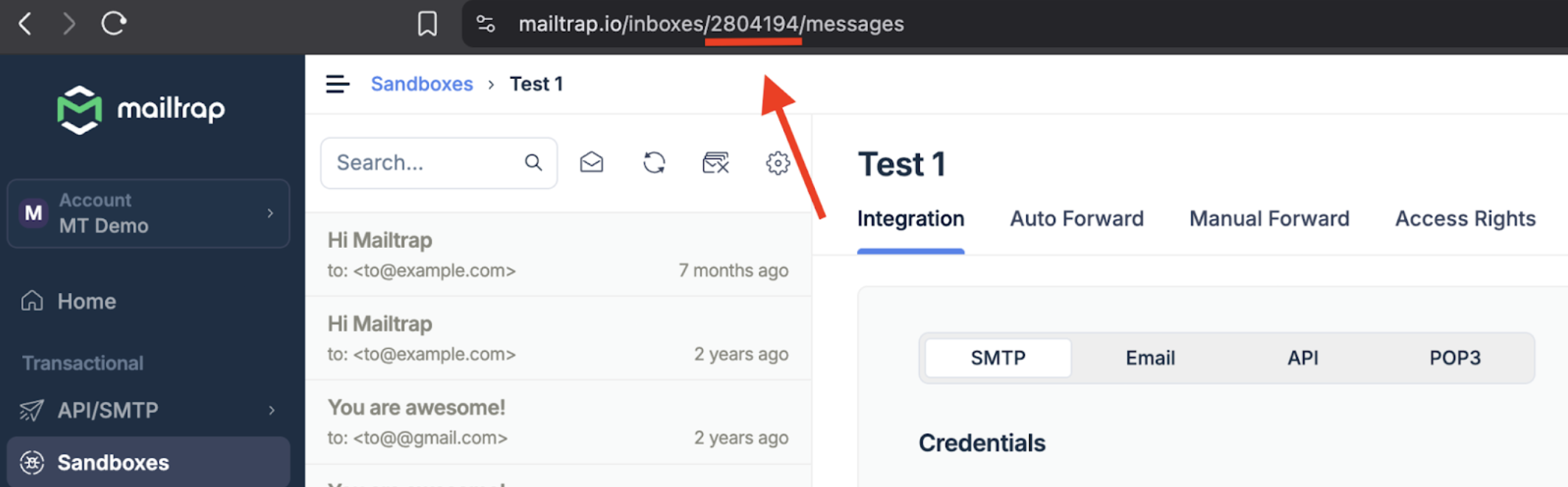
* `MAILTRAP_TEST_INBOX_ID` – If you need sandbox email functionality, you can find this ID in your Sandbox.
Once you insert your Mailtrap credentials and refresh the page or reopen Antigravity, you should see a list of available tools that come with Mailtrap MCP.
### Antigravity + Mailtrap MCP server possible use cases
#### Integrating Mailtrap into your project
To easily integrate Mailtrap into your project, you can simply prompt the Antigravity agent to do it in your stead with a prompt like this one:
> Integrate Mailtrap into my project, so that it can send emails through the Mailtrap email API. Additionally, safely store the Mailtrap credentials from the MCP configuration into an .env file
Antigravity agent will then go through the Mailtrap documentation, integrate the email API, and safely store your credentials in a **.env** file. Then, you can proceed to test the configuration. For instance, here’s our contact form email in our Gmail inbox we used as our `to` address:
And here is the same email in the [Mailtrap Email Logs](https://docs.mailtrap.io/email-api-smtp/analytics/logs):
#### Sandbox operations during code review
If you’re reviewing code for sending emails or emails themselves in a staging environment using [Sandbox](https://mailtrap.io/email-sandbox/), you can trigger sending logic to better understand or verify behavior, test emails, etc.
With Antigravity connected to Mailtrap MCP, you can complete the following actions by prompting the agent:
* Verify what the code actually does without switching to the Mailtrap UI and back to the IDE
* Inspect basic message metadata
* Use the returned message ID to request full message details (content, headers, etc.), and more.
#### Template validation during debugging
Want to edit your templates without switching to the Mailtrap UI? You can prompt the Antigravity agent to list them, fetch a specific template ID, or even change the subject lines you don’t like:
#### Sending emails to your teammate
Furthermore, you can forward the emails you’re working on in Sandbox (or actual templates) to your teammate’s addresses. For this, you can use a prompt like this one:
---
# Agent Instructions
This documentation is published with GitBook. GitBook is the documentation platform designed so that both humans and AI agents can read, navigate, and reason over technical content effectively. Learn more at gitbook.com.
## Querying This Documentation
If you need additional information that is not directly available in this page, you can query the documentation dynamically by asking a question.
Perform an HTTP GET request on the current page URL with the `ask` query parameter, and the optional `goal` query parameter:
```
GET https://docs.mailtrap.io/guides/ai-powered-integrations/antigravity.md?ask=&goal=
```
`ask` is the immediate question: it should be specific, self-contained, and written in natural language.
`goal` is optional and describes the broader end goal you are ultimately trying to accomplish on behalf of the user. GitBook uses it to tailor the answer towards what is most useful for that goal.
The response will contain a direct answer to the question and relevant excerpts and sources from the documentation.
Use this mechanism when the answer is not explicitly present in the current page, you need clarification or additional context, or you want to retrieve related documentation sections.