> For the complete documentation index, see [llms.txt](https://docs.mailtrap.io/llms.txt). Markdown versions of documentation pages are available by appending `.md` to page URLs; this page is available as [Markdown](https://docs.mailtrap.io/email-sandbox/testing/email-headers-and-bcc.md).
# Email Headers and Bcc
Learn how to verify email headers including Subject, From, To, and Bcc fields.
* **Subject line.** View how it looks for the recipient and make sure that they are rendered as expected, especially if you used emojis.
* **FROM** (sender). Make sure the sender's name and email address are correct.
* **TO** (recipients) - To and Cc. When you send multiple emails and/or use "merge" functions, you should carefully check whether recipients are generated correctly.
* **Bcc** - Blind copy, which is not a header, making it especially difficult to test. With Sandbox, you can check whether proper addresses are added (available starting from the [Team plan](https://mailtrap.io/pricing/)).
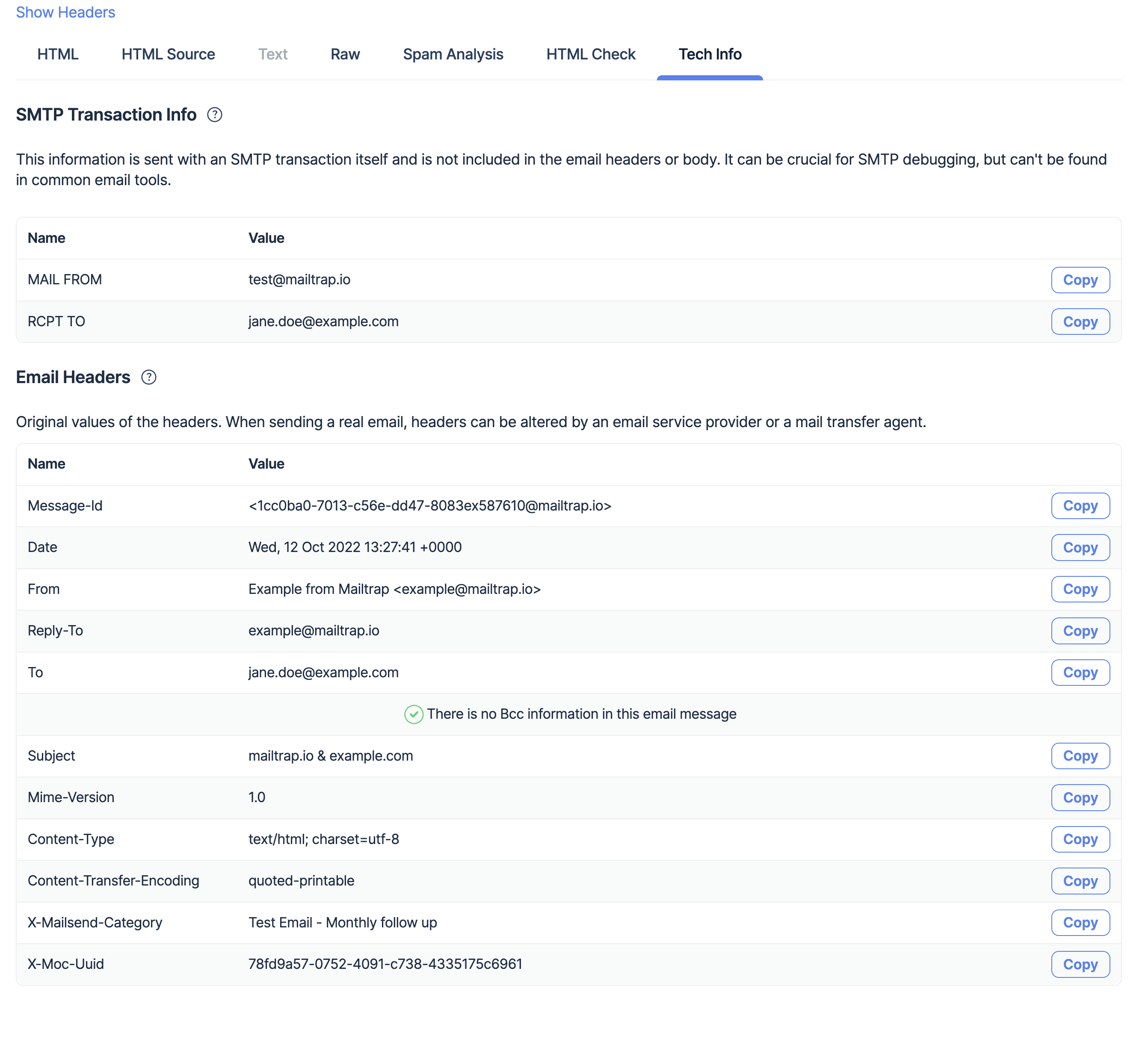
You can perform all these checks in your Mailtrap sandbox. Open the message, and check the Subject, From, and To headers first. Then click **Show Headers** or go to the **Tech Info** tab directly. There, you will find the following information:
* Message-Id
* Message date and time
* Reply-To
* Bcc'ed email address(-es) (if there is no Bcc, then you will see the "There is no Bcc information in this email message" message)
**SMTP Info** section demonstrates the message details according to the SMTP protocol. Mailtrap analyzes SMTP commands of the message, compares message headers and recipients, and then prints out the difference to the Bcc field. To learn more about Bcc and how it works, read:
{% embed url="" %}
Please note that the sandbox shows Bcc 'as is'. It displays an email message for each DATA SMTP command. If an SMTP client fetches Bcc from the RCPT TO command, it will be displayed as one email message in the Mailtrap sandbox. However, some clients send email messages to Bcc'ed addresses as separate RCPT TO **and** DATA commands that result in a separate/second email message in the sandbox.
If you need detailed information about the message metadata, view the **Raw** tab.
---
# Agent Instructions
This documentation is published with GitBook. GitBook is the documentation platform designed so that both humans and AI agents can read, navigate, and reason over technical content effectively. Learn more at gitbook.com.
## Querying This Documentation
If you need additional information that is not directly available in this page, you can query the documentation dynamically by asking a question.
Perform an HTTP GET request on the current page URL with the `ask` query parameter, and the optional `goal` query parameter:
```
GET https://docs.mailtrap.io/email-sandbox/testing/email-headers-and-bcc.md?ask=&goal=
```
`ask` is the immediate question: it should be specific, self-contained, and written in natural language.
`goal` is optional and describes the broader end goal you are ultimately trying to accomplish on behalf of the user. GitBook uses it to tailor the answer towards what is most useful for that goal.
The response will contain a direct answer to the question and relevant excerpts and sources from the documentation.
Use this mechanism when the answer is not explicitly present in the current page, you need clarification or additional context, or you want to retrieve related documentation sections.