> For the complete documentation index, see [llms.txt](https://docs.mailtrap.io/llms.txt). Markdown versions of documentation pages are available by appending `.md` to page URLs; this page is available as [Markdown](https://docs.mailtrap.io/email-sandbox/setup/email-address-per-sandbox.md).
# Email Address per Sandbox
Use a dedicated customizable email address for each sandbox to send test messages without SMTP integration.
This feature offers an email address for testing, which you can customize. It supports dynamic aliases and provides you with an unlimited number of virtual email addresses. As soon as it is linked to your [sandbox](https://mailtrap.io/sandboxes), you can manage, view, and share your test results via the Mailtrap UI.
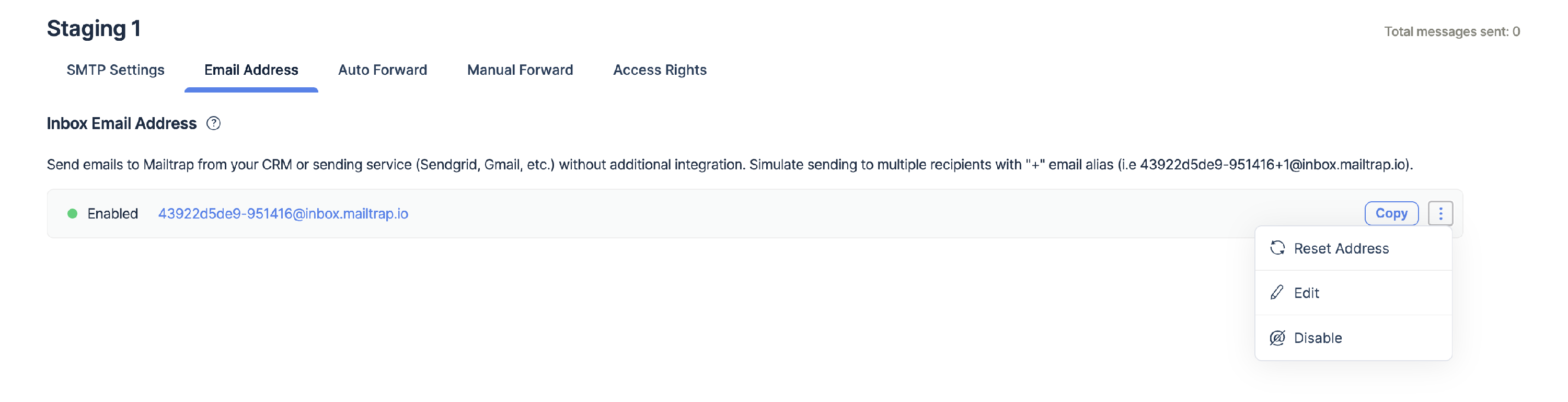
Starting from the [Basic](https://mailtrap.io/pricing/) billing plan, each of your sandboxes includes a dedicated email address you can use to send messages. You will find it in the **Email Address** tab. You can use your current email setup without needing to integrate Mailtrap as a fake server and run safe experiments.
The email address is enabled for you by default. To disable, edit, and reset the email address for this sandbox, click on the three-dots (more) menu.
As you can see from the screenshot, the sandbox address consists of two parts:
* A **customizable alias**, which you can edit manually. You can use any combination of numbers and Latin symbols. For example, you can use your company name or the name of the current sandbox with an identifying number.
* Mailtrap's **technical hash**, which can't be changed. It consists of 6 symbols and acts as our internal sandbox identifier.
This way, you get an infinite number of combinations and can imitate sending emails to a large number of users (with unique email addresses).
The sandbox name changes are applied instantly.
{% hint style="info" %}
Note that Mailtrap verifies sandbox aliases so that if you try to send a message to a custom sandbox address that doesn't exist, you will receive a `554 5.5.1 Error: no sandbox for this email.`message.
{% endhint %}
Additionally, Mailtrap sandboxes support dynamic aliased addresses. For example, [mailtrap-load-test-12ab34+1@inbox.mailtrap.io](mailto:mailtrap-load-test+1-12qb34@mailtrap.io) and [mailtrap-load-test-12ab34](mailto:mailtrap-load-test+2-12qb34@mailtrap.io)[+2](mailto:mailtrap-load-test+2-12qb34@mailtrap.io)[@inbox.mailtrap.io](mailto:mailtrap-load-test+2-12qb34@mailtrap.io) will be equally accepted and delivered to the same sandbox.
As a result of testing, all your experiments will be perfectly sorted and delivered to the corresponding Mailtrap virtual sandboxes. You will be able to review all of the messages and verify their content. This is crucial when you use personalization (especially in a subject line) and dynamic elements or localization.
Another important point is that sending to sandboxes from your production server doesn't affect your domain's reputation for the main email providers like Gmail, Hotmail, Yahoo, etc.
---
# Agent Instructions
This documentation is published with GitBook. GitBook is the documentation platform designed so that both humans and AI agents can read, navigate, and reason over technical content effectively. Learn more at gitbook.com.
## Querying This Documentation
If you need additional information that is not directly available in this page, you can query the documentation dynamically by asking a question.
Perform an HTTP GET request on the current page URL with the `ask` query parameter, and the optional `goal` query parameter:
```
GET https://docs.mailtrap.io/email-sandbox/setup/email-address-per-sandbox.md?ask=&goal=
```
`ask` is the immediate question: it should be specific, self-contained, and written in natural language.
`goal` is optional and describes the broader end goal you are ultimately trying to accomplish on behalf of the user. GitBook uses it to tailor the answer towards what is most useful for that goal.
The response will contain a direct answer to the question and relevant excerpts and sources from the documentation.
Use this mechanism when the answer is not explicitly present in the current page, you need clarification or additional context, or you want to retrieve related documentation sections.