> For the complete documentation index, see [llms.txt](https://docs.mailtrap.io/llms.txt). Markdown versions of documentation pages are available by appending `.md` to page URLs; this page is available as [Markdown](https://docs.mailtrap.io/email-sandbox/management/manual-email-forwarding.md).
# Manual Forwarding
Forward individual emails from sandbox to any inbox for testing in different clients or notifying colleagues.
You can forward emails from sandbox to any inbox.
* View emails in different email clients, or even other apps.
* Notify your colleagues or clients about the testing progress.
* Use it as a proxy between your application and your email client and never miss a thing from your QA environment.
Email forwarding is available starting from the [Basic plan](https://mailtrap.io/pricing/).
### Manual forwarding setup
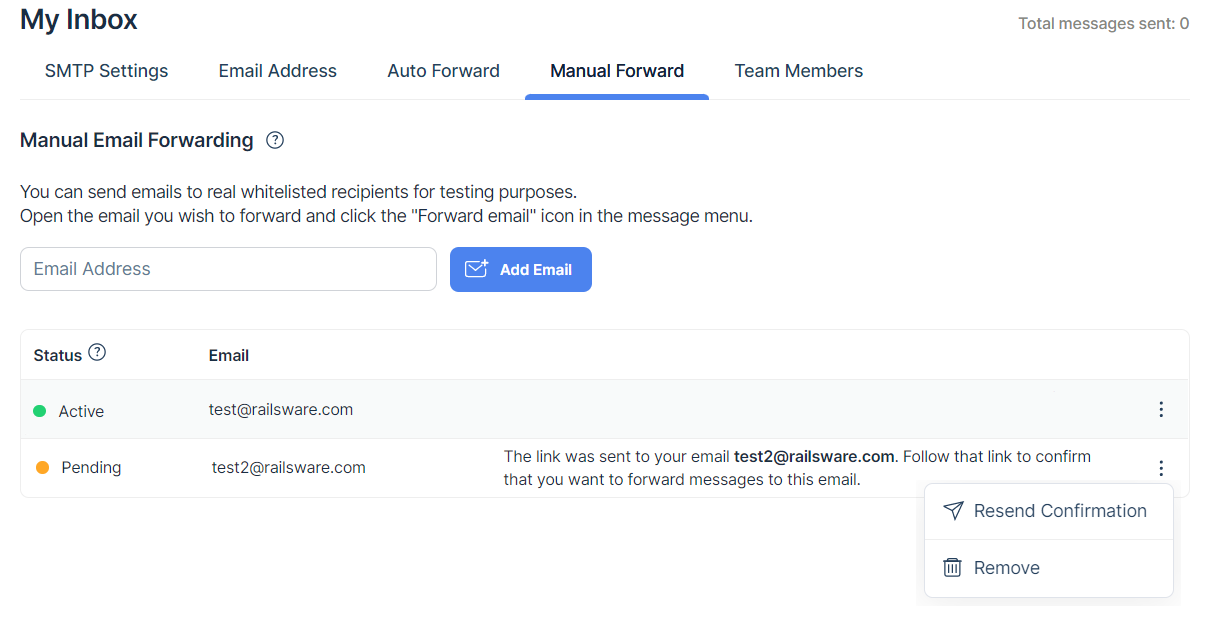
To forward emails manually, go to the **Manual Forward** tab in your sandbox and add the email address for forwarding.
The email confirmation will be sent to this email address for verification. Once the address is confirmed by its owner, you can forward emails to it.
Return to the sandbox, open the message you want to forward and click the forwarding icon in the top-right of the screen.
In the **Manual Forward** tab, you will also find the list of email addresses for forwarding and their statuses:
* *active* means that its owner has confirmed that they agree to receive emails.
* *pending* means that the owner hasn't confirmed that they agree to receive emails.
Click the three-dot menu icon next to the email address to resend confirmation, or to remove this email address.